Restaurant POS · KOT · Billing

Run your restaurantcafédhabacanteencloud kitchen from the phones you already have.

Waiters take orders at the table, the kitchen gets them instantly, bills come out right with GST — and you see every rupee live, wherever you are.

Book a free demo →
Taking a table order in Quartros
🛎️ New order · Table 52× Paneer Tikka, 4× Butter Naan
🔥 Kitchen: readyDal Makhani · 12 min
✅ ₹1,240 paid via UPIBill #2041 · GST included
📈 Today's salesLive on the owner’s phone
Quartros in 2 minutes

How an order flows

One order, four people, zero paper.

  1. 🧑‍🍳

    1 · Waiter

    Order at the table

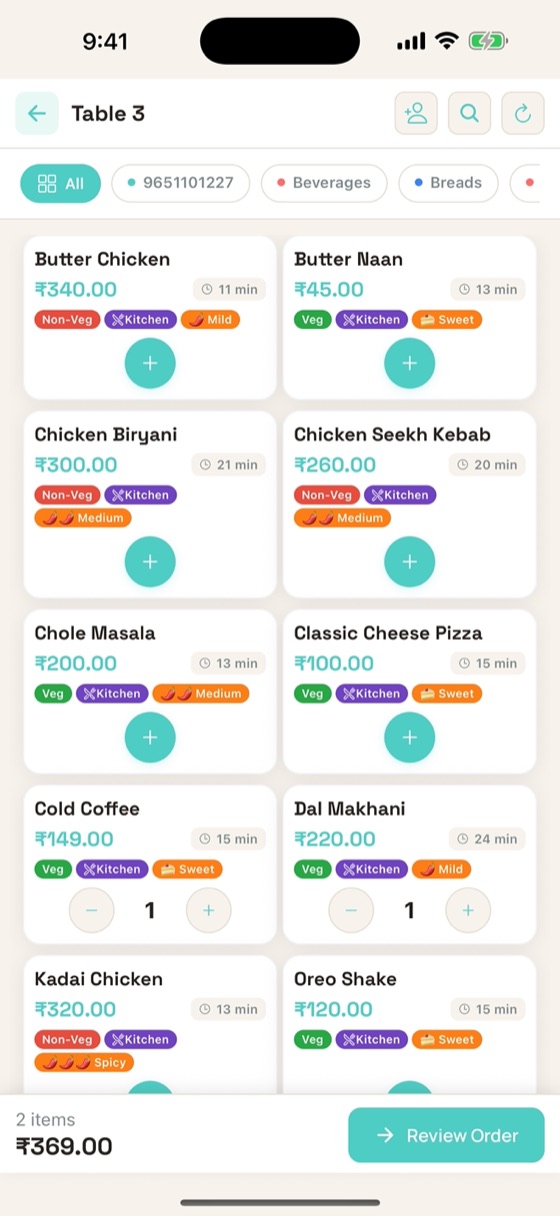
    Items, portions and notes in a few taps — or by voice.

  2. 🔥

    2 · Kitchen

    Kitchen gets it instantly

    Each item moves from preparing to ready to served, with alerts for changes.

  3. 🧾

    3 · Counter

    Bill that adds up

    GST, offers and discounts applied; cash, UPI, card or split.

  4. 📱

    4 · Owner

    Every rupee, live

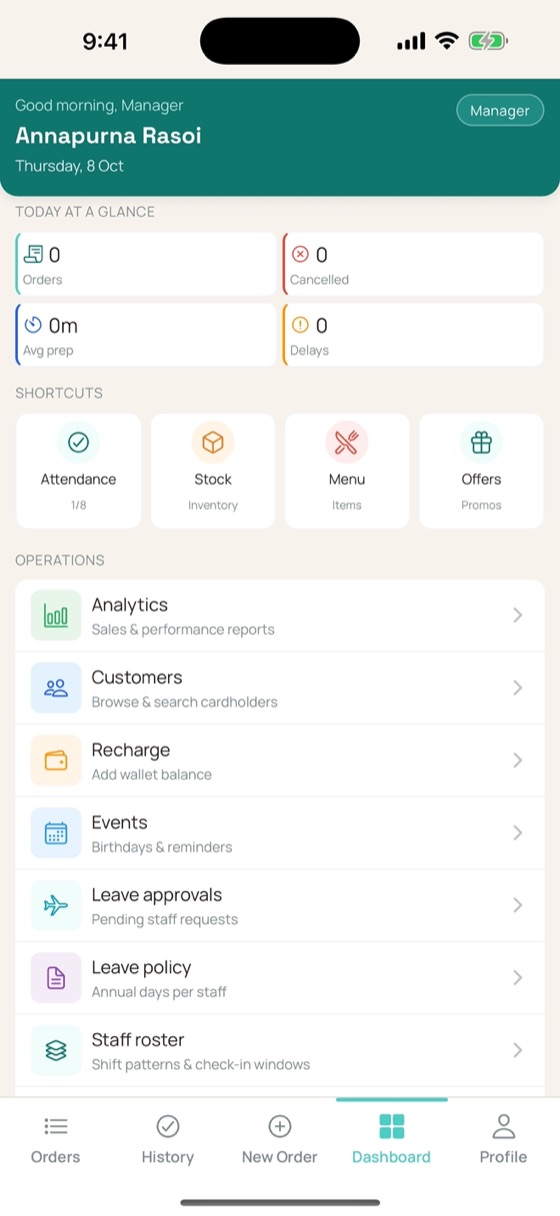
    Collections, cancellations and reports on your phone, wherever you are.

Everything in one app

From the first order to the day-end total.

Kitchen in sync

Every item, live on the kitchen board

Orders reach the kitchen the moment they're placed. Late items stand out; changes and cancellations alert the cook.

Preparing
Paneer Tikka
Dal Makhani
Ready
Butter Naan ×4
Served
Masala Chai ×2
Veg Biryani
Billing

Bills that add up

Subtotal₹1,180
GST 5%₹59
Offer−₹0
Total₹1,239
CashUPICardSplit

No money leaks

Every void needs a reason

  • 1× Spring RollQuality complaint
  • Bill paid below printFlagged
  • Refund #CN-0012Traced

Reports you can trust

Your day, by the hour

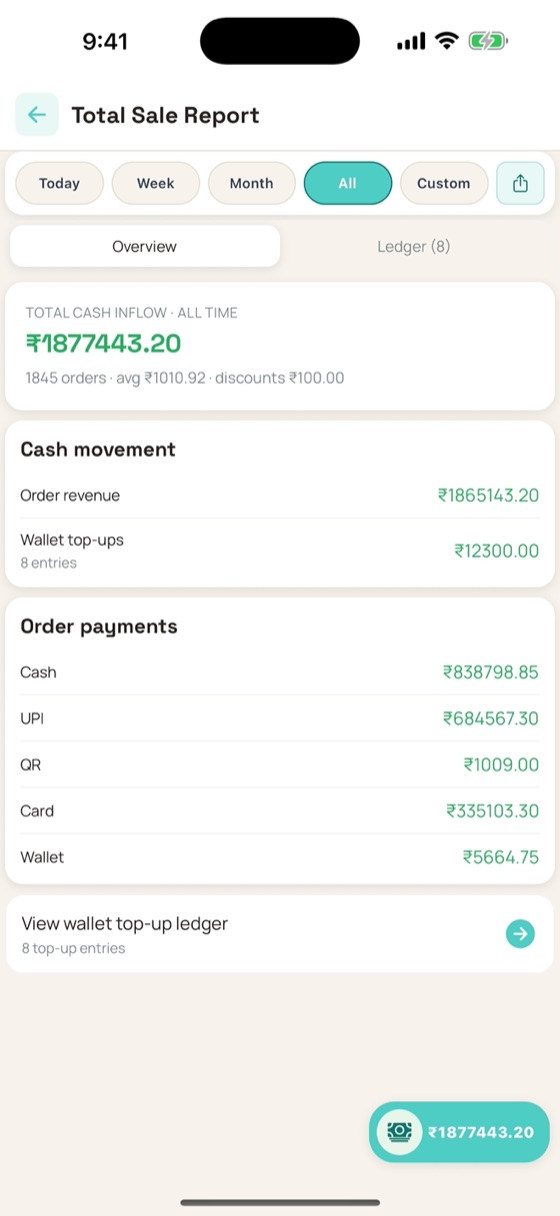
Sales, items, payment modes, peak hours and cancellations — in your restaurant's own day. Export to Excel.

11 am3 pm7 pm11 pm
👥

Staff & attendance

Roles, check-ins, leave, salaries, daily checklists and performance.

📦

Stock & wastage

Stock moves with every sale; wasted items are recorded with the reason.

💳

Wallet & loyalty

Prepaid wallets, recharge bonuses, points and referrals for regulars.

🎙️

Speak, don’t type

Notes and reasons by voice; the whole app in English, Hindi or Arabic.

Your own ordering website

Online orders with zero commission.

Every Quartros restaurant gets its own ordering website. Regulars order from you directly, and the money stays with you instead of going to an aggregator as commission.

  • Your own web address

    yourname.quartros.in, with HTTPS. Share it on WhatsApp, Instagram, Google Maps and your table cards.

  • Menu always in sync

    Built from the menu in your POS. Change a price or switch a dish off, and the site changes with it.

  • Pickup and delivery

    Customers order for pickup or delivery, pay at the counter, on delivery or with their prepaid card.

  • Same board as every order

    Website orders land on your Orders screen next to table orders. Accept within the time you set.

  • Live status for the customer

    Accepted, cooking, out for delivery, delivered: they follow it on their phone without calling you.

  • Ratings and problems, in private

    Customers rate dishes and report a missing item to you, not on a public review site.

  • Installs like an app

    One tap adds your restaurant to their home screen, with your logo.

  • Know when it gets busy

    See how many people are on your site right now, and get an alert before the rush.

What your customers see

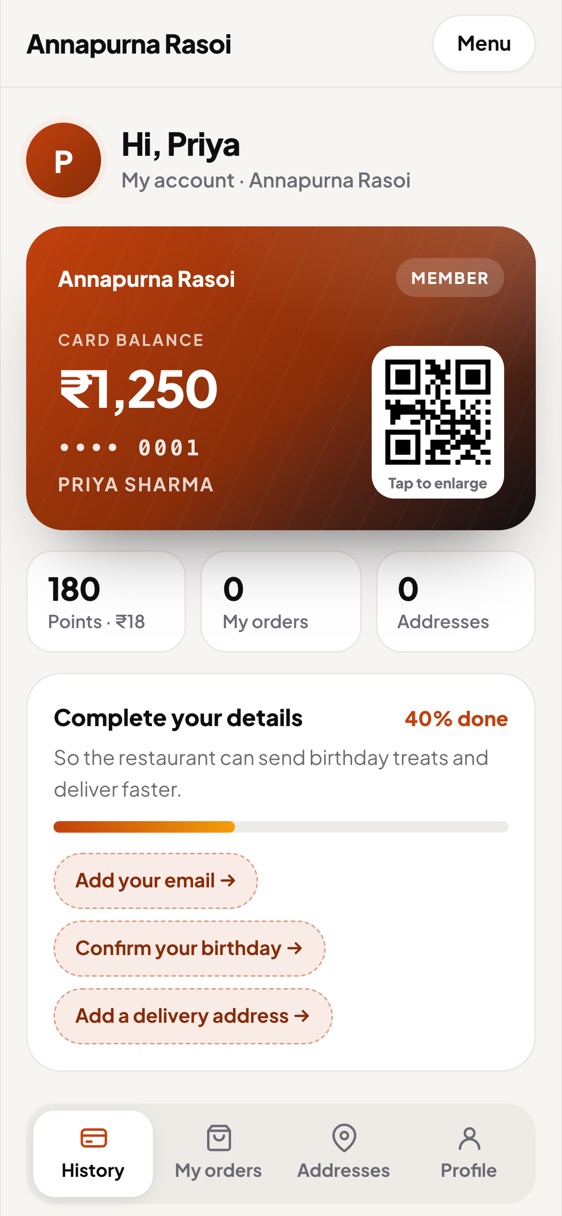
Real screens from Annapurna Rasoi, a restaurant on Quartros. The card belongs to a demo customer.

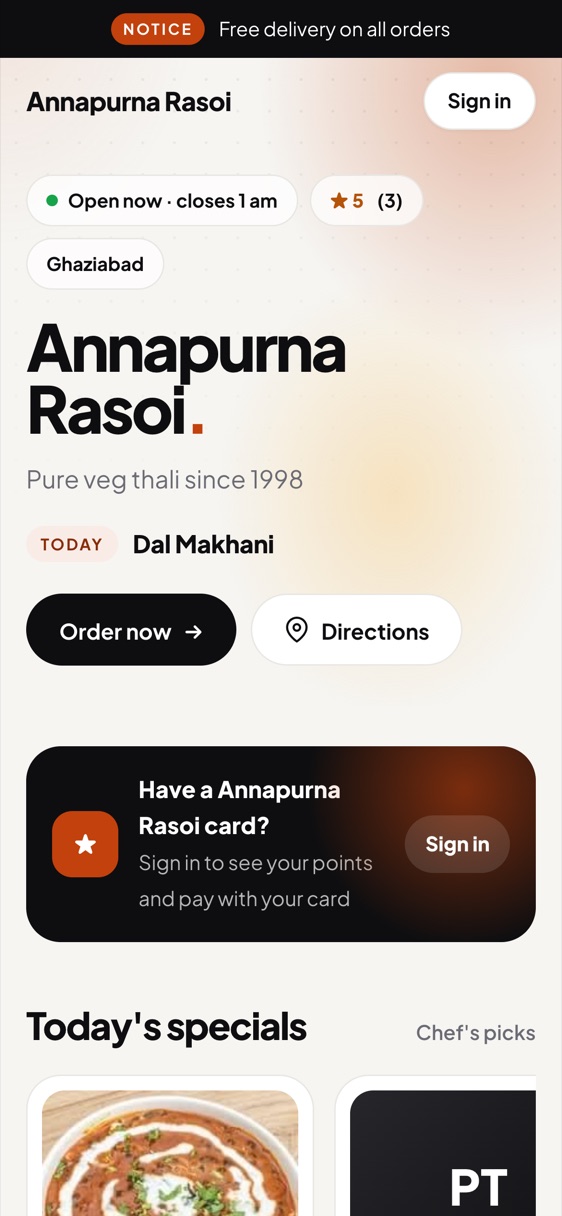
Your home page

Your home page

Opening hours, today's special, directions and a notice for your customers.

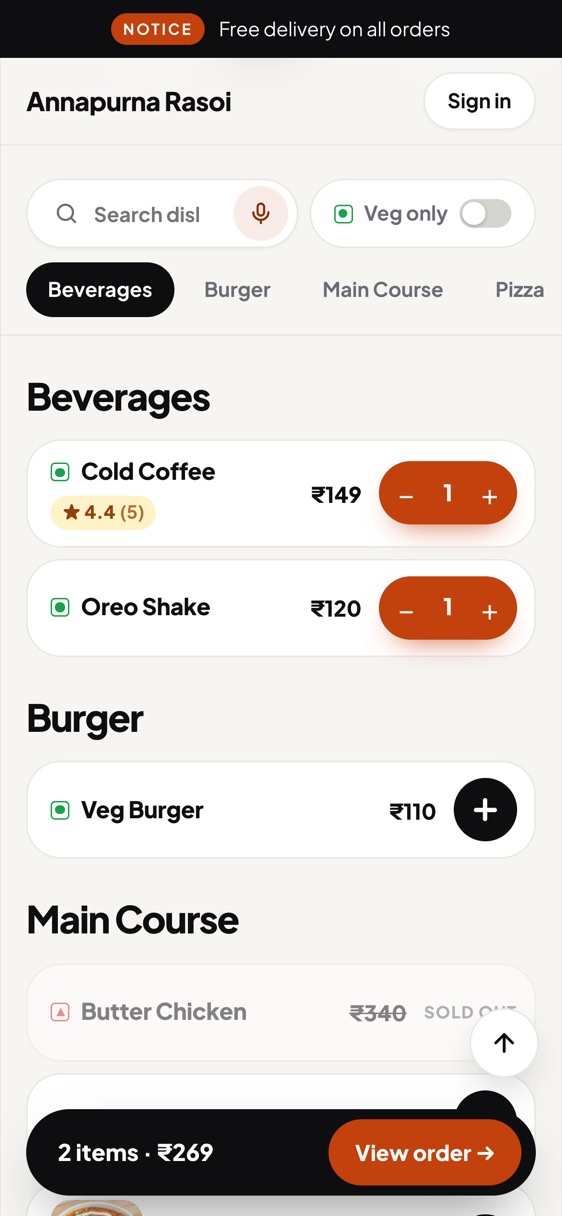
Menu and cart

Menu and cart

Search by typing or speaking, veg-only switch, ratings on each dish.

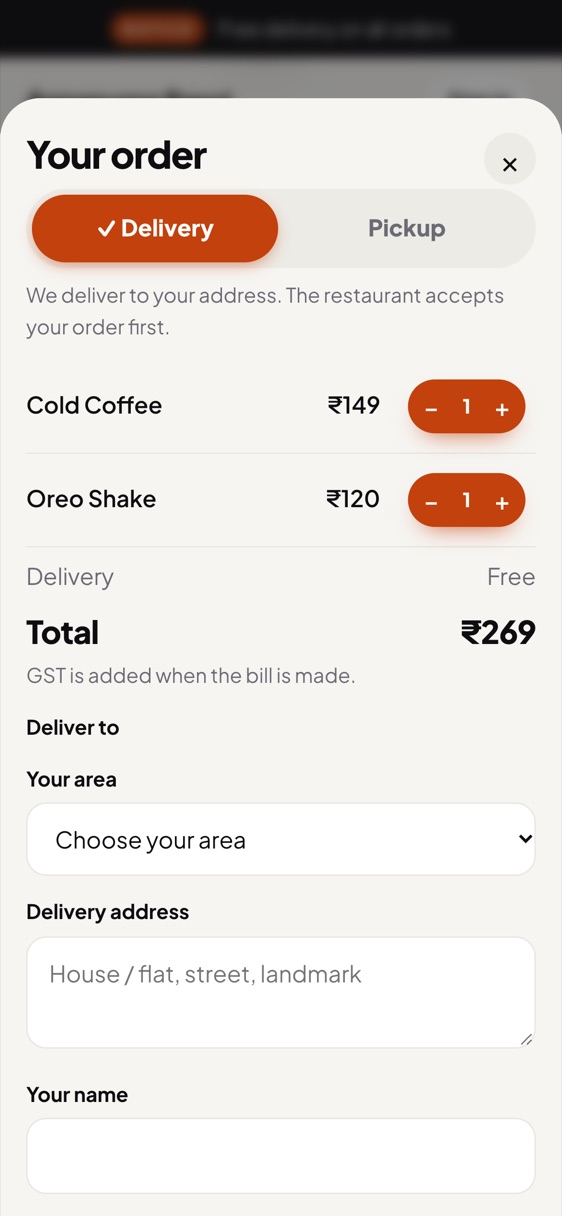
Checkout

Checkout

Delivery or pickup, their area and address. You accept the order first.

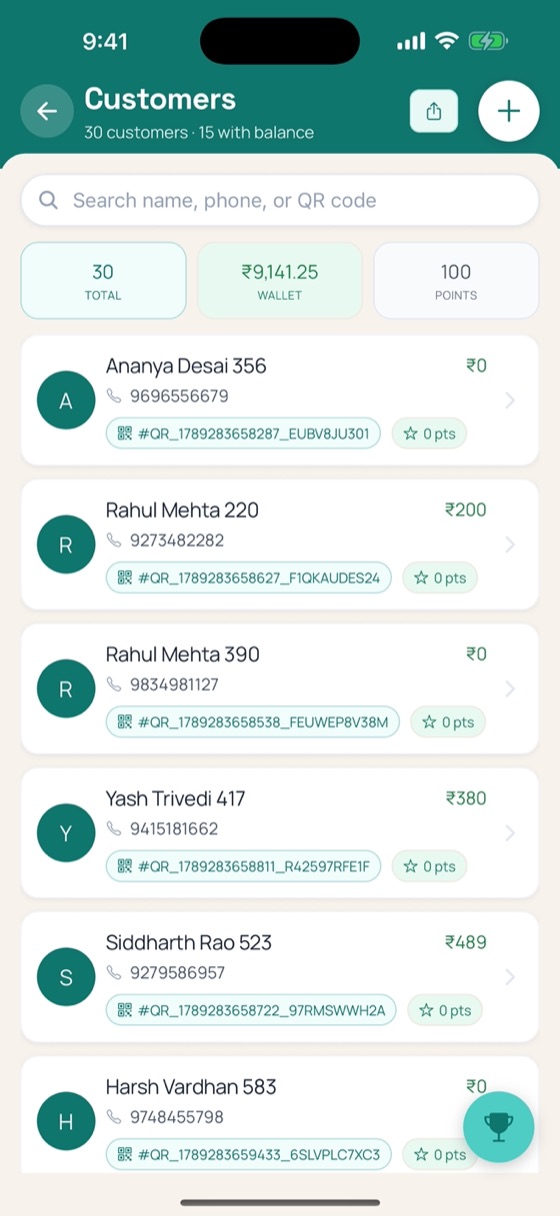
Their own card

Their own card

Balance, points and a QR card. They pay with it online or at the counter.

Commission calculator

How much could you keep?

Enter your own numbers from your aggregator invoice. Nothing is sent anywhere.

You pay aggregators now

a month

a year

You could keep

a year · a month

On a order, the aggregator keeps . On your own website, Quartros keeps nothing.

Get your website →

An estimate from your numbers. Other charges on an aggregator invoice, such as ads or payment fees, are not included, and some customers will keep ordering on the apps.

Delivery

Your own riders, tracked from kitchen to door.

Riders get their own simple screen in the same app. You see where every delivery is and how much cash each rider is carrying.

  • Cash with each rider

    A running total per rider, settled at the end of the shift.

  • When it goes wrong

    Not delivered? The rider picks a reason. Unpaid orders are cancelled; paid ones wait for your refund.

  • Every step on record

    Packed, assigned, out and delivered, each with a time and a name, in the order history.

  1. 1

    Packed

    Serving the last dish marks the order ready. Riders get an alert.

  2. 2

    Rider assigned

    The manager picks a rider, or a free rider takes it.

  3. 3

    Out for delivery

    The rider has the address, a call button and directions.

  4. 4

    Delivered

    Cash or UPI collected at the door is added to what the rider holds.

For the owner

Know what happened, even when you weren't there.

Every cancelled bill, price change and refund is recorded with who did it, when and from which phone. The record can't be quietly edited.

Security log

Who did what, and when

  • 21:14 Bill #2088 cancelled after paymentManager · reason: customer left Alert
  • 20:52 UPI id changed in settingsOwner · new phone Worth a look
  • 19:30 Marked present by hand: RaviManager · backdated Worth a look
  • 18:05 Price changed: Paneer Tikka ₹260 → ₹280Manager Worth a look

Sign-ins, orders, money, menu, staff, settings, stock and attendance. Each entry is chained to the one before it, so a deleted or edited entry shows.

Every night

Your day summary

Half an hour after closing, one notification: sales, top dishes, voids, staff, and anything that looks like a leak.

Sales₹48,320
Bills126
Voids3 · ₹640
2 bills paid below their printed total

Alerts

Told the moment it matters

A push to your phone for the things that need you: a paid bill cancelled, an order deleted, a payout or stock purchase deleted, a cooked dish cancelled with no reason.

No silent changes

Reasons, not excuses

Cancelling an item, voiding a dish or refunding a bill needs a reason, and reports show them all.

Your data

Yours to download

One tap gives you every bill, customer, refund, stock entry and attendance record in a single Excel file.

Your team

Opening checks, shifts and who did what, without a register.

Tasks & checklists

Add-on

Checklists with photo proof

  • ✓ Gas valves off
  • ✓ Fridge below 5°C · photo
  • Floor mopped · photo

Daily or weekly checklists and one-off tasks. Staff tick each step and add photos; a manager verifies.

Attendance & roster

On time, late or on leave

RaviOn time · 09:58
SunitaLate · 10:22
ArjunOn leave

Staff mark attendance on their own phone against your shifts. Leave requests, approvals, salary and advances in one place.

Staff performance

Numbers per person

Ravisales taken
Sunitasales taken
Arjunsales taken

Sales each person took, payments they collected, cancellations, dishes served and kitchen preparation times.

Built for your kind of place

Same app, set up the way you work.

Restaurant POS that runs on your team's phones

Table orders, kitchen tickets, GST bills, stock, staff and day-end reports — one app for a full-service restaurant, without new hardware.

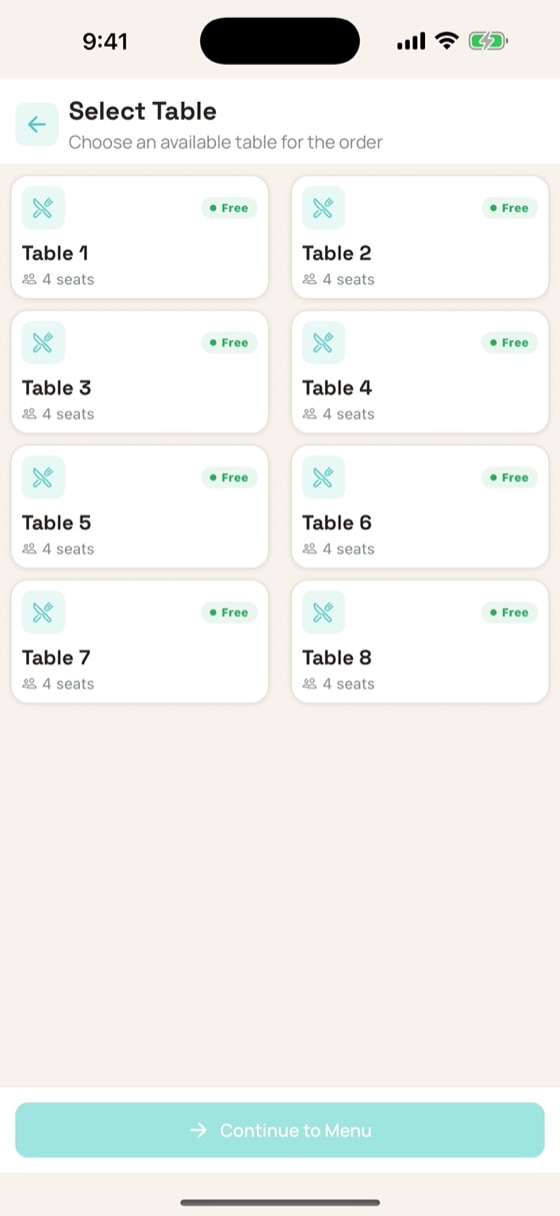
  • ✓Tables at a glance See which tables are free, occupied or waiting to pay; move an order to another table in one tap.
  • ✓Kitchen in sync Preparing, ready, served — per item, with late items highlighted.
  • ✓GST billing & split payments Cash, UPI, card or split; service charge, offers and manager discounts applied correctly.
  • ✓Delivery & takeaway Take phone orders with the customer's name and address alongside dine-in.
  • ✓Stock & wastage Stock goes down as dishes are sold; wasted items are recorded with the reason.
  • ✓Staff, attendance & payroll Roles for owner, manager, waiter and kitchen; check-ins, leave, salaries and performance.
More for restaurants →
Taking a table order in Quartros

Getting started

Up and running the same day.

  1. 1

    We set you up

    Your menu, tables, taxes and staff — added with you, so nothing is missed.

  2. 2

    Your team logs in

    Each person signs in with their phone number and a passcode, on their own phone.

  3. 3

    You see everything

    Orders, kitchen, bills and reports — live, from anywhere.

Prefer to see it first?

A two-minute tour of ordering, the kitchen, billing and the owner's view.

3

languages

0

new hardware

1 day

to go live

Questions

Frequently asked

Do I need to buy any hardware?+

No. Quartros runs on Android phones and iPhones your team already has. For printed bills and KOTs it works with Bluetooth and Wi-Fi thermal printers.

Do you take a commission on website orders?+

No. Orders from your own Quartros website reach you with no commission, and the menu comes straight from your POS, so you don't maintain it twice.

Does it work on iPhone too?+

Yes. Quartros is on Google Play and the App Store, and the same account works on both.

Does it handle GST?+

Yes. Set your GST slab once (5%, 18%, a custom rate or exempt) and every bill is calculated correctly, with service charge and discounts if you use them.

Can my staff use it in Hindi?+

Yes. The whole app works in English, Hindi and Arabic, and notes and reasons can be spoken instead of typed.

How do we get started?+

Book a free demo. We set up your menu, tables, taxes and staff with you, and your team can start taking orders the same day.

Talk to us

See Quartros on your own menu

Book a free demo — we'll show you how it fits your restaurant, café or canteen.